Home/BoltOS
Operating system · C + x86-64 assembly · Active development
BoltOS
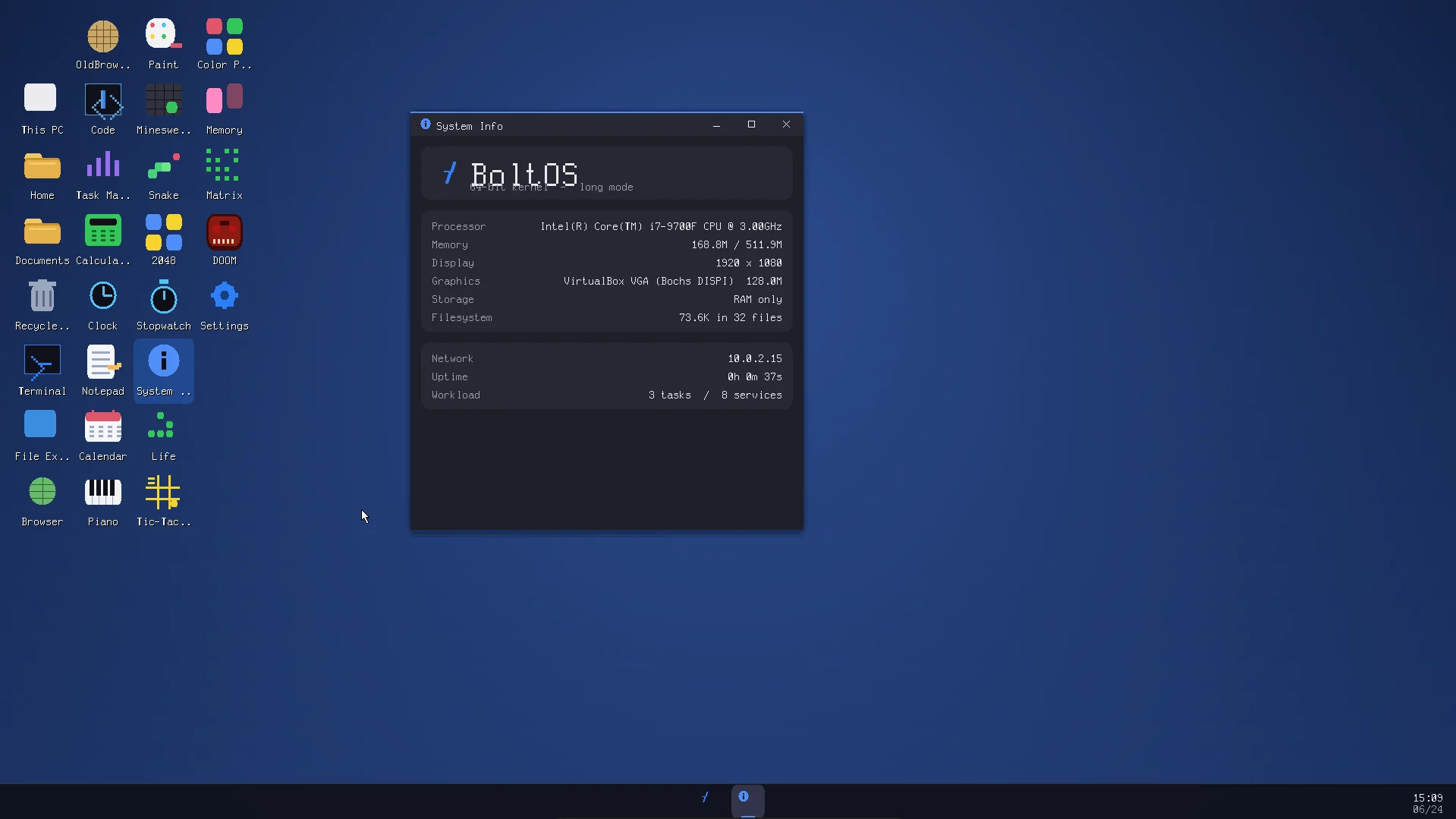
A 64-bit operating system written from scratch in C and x86-64 assembly: no GRUB, no Multiboot, no external libraries. It has its own boot chain, its own kernel, a real network stack, compilers, and a desktop with 43 apps. It also runs DOOM.
What it's made of
Almost all C. The scary part is assembly.
The 870 lines of assembly are the parts that run before C can: the 512-byte boot sector, the real-mode loader, and the jump into 64-bit long mode. Everything after that is C.
- C36,340
- Headers3,870
- Assembly870
- Shell460
- Python tools220
- Linker scripts62
From the BoltOS README's project stats. Excludes the vendored doomgeneric port, libcss and NetSurf libraries.
Boot flow
Two ways in. Both written by hand.
Old PCs start in 16-bit real mode and read a 512-byte boot sector. New ones run UEFI. BoltOS supports both, and both paths end at the same 64-bit kernel entry at physical address 0x100000. Scroll to boot.
Legacy BIOS
MBR- BIOS loads stage1
512-byte MBR at 0x7C00 · INT 13h LBA read - stage2 in real mode
loaded at 0x8000 · 5-second boot menu - Find the kernel
boot header at LBA 33 → kernel LBA + sector count - Prepare memory
enable A20 · BIOS E820 memory map - Copy the kernel
unreal mode → copy kernel to 1 MiB - Page tables
PML4 / PDPT / PD · identity 0–4 GiB · 2 MiB pages - Long mode
kernel/boot.asm _start at 0x100000 · stack · zero BSS - kmain(bootinfo)
kernel/main.c · higher half from here on
UEFI
BOOTX64.EFI- Firmware loads the app
boot/uefi_boot.c built as BOOTX64.EFI - Boot menu
BoltOS · Safe mode · Recovery · BoltOS + fsck - Find the screen
locate the GOP handle → framebuffer - Memory map
UEFI map → E820-like table for the kernel - Page tables
identity map + higher half - Long mode
jump to 0x100000 · same _start as BIOS - kmain(bootinfo)
framebuffer + memory map arrive in RDI
The boot menu, recreated
Both loaders open with a five-second menu and pass your choice to the kernel in bootinfo.boot_flags. Safe mode and recovery are how you get back in when a bad setting or a crashing app stops the boot.
Click an option, or focus the menu and use the arrow keys and Enter.
Memory layout
Loaded low. Running high.
BoltOS is a higher-half kernel. It is loaded at physical 1 MiB, but linked to run near the very top of the 64-bit address space. boot.asm jumps from the low identity-mapped entry up to its linked address and never looks back.
Virtual address
Physical address
Not to scale. The kernel's top 2 GiB are mapped to physical 0 by the bootloader before the jump.
Inside the system
Eight subsystems, zero borrowed kernels.
Pick a subsystem. Everything listed is in the BoltOS source today.
- Higher-half 64-bit kernel linked at 0xFFFFFFFF80100000
- Preemptive round-robin scheduler with processes
- Symmetric multiprocessing via ACPI, APIC and HPET
- Preemptible syscalls that run with interrupts enabled
- Per-CPU SSE and FPU state across context switches
- Suspend to RAM (ACPI S3) with a real-mode wake path
- Watchdog, kill and resource reclamation
- Kernel log ring buffer, readable with dmesg
The desktop
It feels like a real OS because it acts like one.
Window tiling
Drag a window to an edge for a half, a corner for a quarter, the top to maximize. The landing zone is drawn before you let go. Win+arrows walk between zones.
Four virtual desktops
A window on another desktop isn't just hidden. It's out of the taskbar, out of Alt+Tab and out of every hit test, so nothing can reach it by accident.
Press Win and type
Apps filter as you type. From the second character the search walks your home folder too, skipping dotfiles and anything you can't read. Five results, on purpose.
A selection of the 43 apps
E1M1
It runs DOOM.
Real DOOM, not a clone. The doomgeneric port is built against a tiny in-house libc shim and a BoltOS platform layer. The shareware WAD is embedded in the kernel image, and the engine's 640×400 framebuffer is drawn into a normal desktop window.
Developer tools
You can write software for BoltOS, on BoltOS.
BoltOS ships its own C, C++ and C# compilers, a Python interpreter, an x86-64 assembler, a linker, make, a source-level debugger and version control. It can even run real Windows .exe files through an in-kernel kernel32 shim.
A replay using real BoltOS shell commands. Output is abbreviated.
Networking
From the Wi-Fi radio to HTTPS.
Every layer of this stack is written for BoltOS. It gets its own IPv6 address with SLAAC, checks X.509 certificates, and serves SSH. Settings survive a reboot in /etc/network.conf.
About the radio: QEMU emulates no Wi-Fi device, so the 802.11 and WPA2 stack runs against a simulated access point inside the kernel. A DHCP lease, a DNS lookup and an HTTPS fetch all travel the full encrypted 802.11 path. A driver for a real Wi-Fi chip is the missing piece, and the README says so plainly.
Safety and robustness
Built to crash gracefully.
ASLR, SMEP and SMAP
Ring-3 programs land at random addresses, and the CPU stops the kernel from running or reading user memory by accident.
Stack canaries
StackGuard puts a canary on the kernel stack so a buffer overflow is caught instead of quietly taking over.
Crash-safe BoltFS
Atomic commits and flush barriers mean a power cut leaves either the old state or the new one. fsck checks the rest.
Fault isolation
A crashing app writes a crash log and a core dump with a symbolised backtrace. The desktop keeps running.
Fuzzing
The parts that read data from strangers, like the TCP, TLS, X.509 and HTTP parsers, get fuzzed, because they run in ring 0.
Multi-user
Accounts, groups, file ownership and chmod, with sudo for the moments that need it.
boltsh
114 commands and counting.
The shell has variables, conditions, loops and functions. Here is every command in the README.
lstreecdmkdirrmcpmvfindtrashrecoverpwdtouchwriteeditchmodchowncatheadtailhexmetadiffgrepchecksumpreviewcountsysinfocpuinfomeminfodiskinfosyncfsckuptimebatterysensorsdevicesversionhealthpoweroffrebootsuspendinstalldmesgcrashlogcorecrashpskilltopfreezeresumeservicesservicejobsprioritymonitorwhoamiidgroupsusersuseradduserdelpasswdsudolocklogoutnetinfoifconfigpingtraceportsdownloadbrowsewebxuploadwififirewallhostsdnsntpservenetgetsshdsshkeymakebuildvcsasldarcccompilepkgwinrunrunmanhelpplaymediamixerscreenshotnotifydesksnapusbfocussnapshottimelinedoctorassistantsandboxworkspacepanicstoryBuild it yourself
Three commands to boot.
The build makes a raw disk image, a bootable ISO and a UEFI app, and compiles DOOM into the kernel. Then QEMU boots it, with kernel output on the serial port.
# clone
git clone https://github.com/adriantips/boltossource
cd boltossource

# build → iso/os.img + iso/boltos.iso
bash build.sh

# boot with legacy BIOS, or with UEFI (OVMF)
bash run.sh
bash run-uefi.sh
boltossource/
├─ boot/      stage1 + stage2 (MBR) + uefi_boot.c
├─ kernel/    scheduler, syscalls, GUI + 43 apps
├─ drivers/   NVMe, AHCI, xHCI, e1000, HDA ...
├─ fs/        BoltFS, EXT2, FAT32
├─ mm/        PMM, heap, VM, DMA, swap
├─ net/       TCP/IP, TLS, X.509, 802.11
├─ libc/      freestanding C library
├─ user/      ring-3 programs, ELF64 + PE32+
├─ include/   80+ headers
├─ doom/      doomgeneric + BoltOS layer
├─ oldbrowser/ NetSurf port
├─ linker.ld  kernel at 0x100000
└─ build.sh   disk image + ISO + UEFI
Lineage
Four repos to get here.
boltOS
The first BoltOS repo: "an operating system made completely from scratch in C."
boltoperatingsystem
A second repo for the same OS, two weeks in.
boltossource-old
The earlier source tree, kept for reference.
boltossource
The 64-bit rewrite: UEFI, SMP, a real network stack. 125 commits and counting.
F5 · TRY IT
Boot a tribute in your browser.
A browser-sized BoltOS desktop with snapping windows, four virtual desktops, a search-as-you-type Start menu, and apps you can actually use. The real thing is on GitHub.